

TL;DR:
- Programmable thermostats automatically adjust home temperatures based on schedules, saving up to 10% on energy bills. Proper setup and avoiding manual overrides maximize savings and extend HVAC lifespan. They meet 2024 code requirements, with smarter models offering remote control and learning features for added convenience.
Programmable thermostats are defined as devices that automatically adjust your home’s temperature based on a preset schedule, reducing energy use without requiring manual changes throughout the day. The role of programmable thermostats is to manage your heating and cooling system so it runs only when needed, cutting waste and keeping your home comfortable around the clock. The U.S. Department of Energy confirms homeowners can save up to 10% annually on heating and cooling bills through proper thermostat programming. The 2024 International Residential Code now requires every heating and cooling system to include a thermostat capable of automatic setback, making programmable models a code-compliant standard for new and upgraded installations.
How do programmable thermostats work to control heating and cooling?
A programmable thermostat works by letting you set different temperature targets for different times of day and days of the week. The device signals your HVAC system to heat or cool to the target temperature, then shuts down once that target is reached. This scheduling function is what separates programmable models from basic manual thermostats, which hold one fixed temperature until you physically change it.

The core energy-saving mechanism is the setback period. A setback is a scheduled temperature reduction during times when no one is home or everyone is asleep. Savings accrue at roughly 1% for every degree of setback maintained over an 8-hour period. That means a 10-degree setback for 8 hours each night can reduce your heating bill by close to 10% on its own.
Most programmable thermostats offer these scheduling options:
- 7-day programming: A unique schedule for every day of the week, ideal for households with irregular routines.
- 5+2 programming: One schedule for weekdays and a separate one for weekends.
- 5+1+1 programming: Separate schedules for weekdays, Saturday, and Sunday.
Smart thermostats extend these basics with Wi-Fi connectivity, occupancy sensors, and learning algorithms that adapt to your habits over time. They go beyond the minimum setback requirements set by the IRC 2024 code. Standard programmable models, by contrast, work without an internet connection and suit households with consistent, predictable daily schedules.
Proper scheduling also protects your HVAC equipment. When your system runs fewer unnecessary cycles, mechanical components experience less wear. Optimizing HVAC run cycles through scheduled setbacks directly extends equipment lifespan.
Pro Tip: Set your thermostat to begin warming or cooling your home 20 to 30 minutes before you wake up or arrive home. Your system reaches the target temperature right when you need it, without running all day.
What are the main benefits of using programmable thermostats?
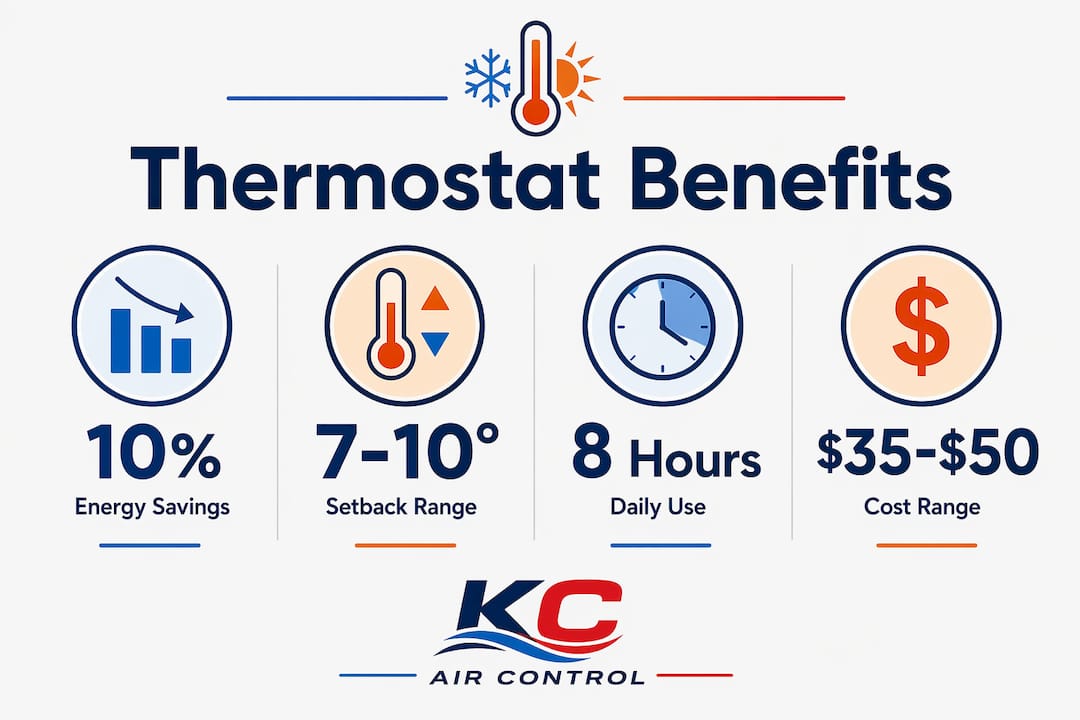
The most direct benefit is lower energy bills. Properly programming a setback of 7 to 10 degrees for 8 hours daily can cut annual heating and cooling costs by up to 10%. For a household spending $1,500 per year on energy, that is $150 back in your pocket every year.
Beyond cost savings, programmable thermostats deliver these advantages:
- Consistent comfort: Your home reaches your preferred temperature before you wake up or walk in the door, without you touching a dial.
- Reduced HVAC wear: Scheduling reduces unnecessary cycling, which lowers mechanical stress on your furnace, air handler, and compressor.
- Lower carbon footprint: Less energy consumed means fewer emissions from your utility provider’s power generation.
- Code compliance: The IRC 2024 setback requirement mandates at least two temperature setpoints with a minimum 2°F differential. Programmable thermostats satisfy this standard; manual models do not.
- Energy usage visibility: Many mid-range and higher-end models track runtime history, giving you a clear picture of how hard your system is working each week.
Two common pitfalls undercut these benefits. First, frequent manual overrides and the “hold” function bypass your programmed schedule entirely, erasing the savings you set up. Second, poor initial programming, such as setting temperatures too close together or forgetting to account for weekends, leaves energy savings on the table. The technology works only as well as the schedule behind it.
For a broader look at energy-saving HVAC practices that complement thermostat scheduling, Kcaircontrol has published practical guidance specific to Kansas City homes.
How do programmable thermostats compare with smart and manual models?
Choosing the right thermostat comes down to your budget, your schedule, and how much setup time you want to invest. Each thermostat type serves a different household profile.
| Feature | Manual thermostat | Programmable thermostat | Smart thermostat |
|---|---|---|---|
| Temperature scheduling | None | Yes, by time and day | Yes, plus learning and remote access |
| Typical cost | Under $30 | $35–$50 (base models) | $150 and up |
| Payback period | No savings | Under 1 year | Up to 3 years |
| Internet required | No | No | Yes |
| IRC 2024 compliant | No | Yes | Yes |
| Best for | Rarely changing temps | Predictable daily routines | Variable schedules, tech-forward users |
Base-level programmable thermostats cost $35–$50 and typically pay for themselves within one year. Higher-end models can cost $150 or more and may take up to 3 years to break even. That payback gap matters when you are deciding how much to spend.
Smart thermostats add genuine convenience through remote control via smartphone apps and occupancy detection that adjusts temperatures when the house is unexpectedly empty. Smart features offer enhanced savings but require a stable internet connection and, in many cases, a C-wire for power. For households with predictable schedules, standard programmable models deliver reliable savings without the added complexity or cost.
Manual thermostats remain the simplest option but offer no automatic setback. They cannot meet the IRC 2024 setback requirement and provide no path to the 10% energy savings that scheduled programming delivers.
Pro Tip: If you are replacing a manual thermostat, check whether your HVAC system has a C-wire before purchasing any digital model. A missing C-wire is the most common reason a new thermostat fails to power on after installation.
What practical tips help you get the most from a programmable thermostat?
Getting real savings from a programmable thermostat requires more than plugging it in. Follow these steps to set it up correctly from day one.
- Set a realistic setback. Program a 7 to 10 degree setback for every 8-hour period when the house is empty or everyone is asleep. This range delivers the maximum savings without making your home uncomfortable on return.
- Avoid the hold function. Using “hold” or manual overrides frequently cancels your programmed schedule and eliminates the savings you built in. Use temporary overrides only when genuinely needed.
- Do not crank the thermostat down to speed cooling. Setting the target temperature drastically lower does not cool your home faster. Your HVAC system runs at the same rate regardless of the gap between current and target temperature. A larger gap just means a longer run time and a higher bill.
- Check your wiring before installing. Most digital programmable and smart thermostats require a C-wire for a steady power supply. Older homes may not have one run to the thermostat location. Confirm compatibility before you buy.
- Reprogram for seasonal changes. Your summer and winter schedules should differ. In Kansas City, heating season and cooling season have very different peak demand hours. Update your program in the fall and spring to match your actual routine.
- Review and adjust after 30 days. Check your energy bill after the first full month on a new schedule. If savings are lower than expected, look for overrides in the history log and tighten your programming.
For a complete set of HVAC efficiency tips that work alongside thermostat scheduling, Kcaircontrol’s guide covers the full picture for Kansas City homeowners.
Pro Tip: Label each time block in your program with a real-life event, such as “wake up,” “leave for work,” or “bedtime.” This makes it far easier to spot scheduling gaps when you review your program later.
Key Takeaways
Programmable thermostats deliver up to 10% annual energy savings when schedules are set correctly and manual overrides are avoided consistently.
| Point | Details |
|---|---|
| Core energy savings | A 7 to 10 degree setback for 8 hours daily cuts heating and cooling costs by up to 10% per year. |
| Fast payback | Base models cost $35–$50 and typically pay for themselves within one year of installation. |
| HVAC lifespan benefit | Scheduled setbacks reduce unnecessary cycling, lowering mechanical wear on your furnace and AC. |
| IRC 2024 compliance | The 2024 code requires automatic setback capability; manual thermostats do not meet this standard. |
| Avoid common mistakes | Frequent use of the hold function or drastic temperature drops cancels out your programmed savings. |
Why the thermostat is often the most overlooked upgrade in the house
After working with HVAC systems for years, I keep seeing the same pattern. Homeowners spend thousands on new furnaces or air conditioners, then connect them to a $20 manual thermostat. The equipment is capable of running efficiently. The thermostat prevents it from doing so.
The best thermostat is the one you actually program correctly. A $200 smart thermostat left on “hold” all day saves nothing. A $45 programmable model with a well-built schedule saves money every single month. Complexity without proper use is just wasted money.
What I find most underappreciated is the equipment protection angle. Every unnecessary heating or cooling cycle adds wear to your compressor, heat exchanger, and blower motor. Reducing those cycles through consistent scheduling is one of the lowest-cost ways to extend the life of a system that costs $5,000 to $10,000 to replace. That math is hard to argue with.
My honest recommendation: start with a standard programmable thermostat if your household runs on a predictable schedule. Learn it, use it fully, and see the savings before deciding whether a smart upgrade is worth the extra cost. The technology is only as good as the person programming it.
— AB
Kcaircontrol can help you choose and install the right thermostat
Selecting the right thermostat is only half the job. Proper installation, wiring checks, and system compatibility testing are what make the difference between a thermostat that works and one that sits on the wall doing nothing.

Kcaircontrol has served Kansas City homeowners for over 70 years, handling everything from thermostat upgrades to full furnace repair and replacement. Our technicians check your wiring, confirm C-wire availability, and match the right thermostat to your HVAC system before installation begins. If your system needs attention beyond the thermostat, we can identify those issues during the same visit. Contact Kcaircontrol today to schedule an evaluation and get your home running at its most efficient.
FAQ
What is a programmable thermostat?
A programmable thermostat is a device that automatically adjusts your home’s temperature based on a preset daily or weekly schedule. It replaces manual temperature changes and reduces energy use during unoccupied or sleeping hours.
How much can a programmable thermostat save on energy bills?
Homeowners can save up to 10% annually on heating and cooling costs by programming a setback of 7 to 10 degrees for 8 hours each day. Savings accumulate at approximately 1% per degree of setback over that 8-hour window.
Do programmable thermostats meet the 2024 building code?
Yes. The 2024 International Residential Code requires each HVAC system to have a thermostat capable of automatic setback with at least two temperature setpoints. Programmable and smart thermostats meet this requirement; manual thermostats do not.
What is the difference between a programmable and a smart thermostat?
Programmable thermostats follow a fixed schedule you set manually and require no internet connection. Smart thermostats add Wi-Fi control, occupancy sensing, and learning features, but cost more and typically take up to 3 years to pay back their higher purchase price.
Why is my programmable thermostat not saving energy?
The most common cause is frequent use of the manual override or hold function, which cancels your programmed schedule. Inconsistent programming and setting temperature gaps that are too small also reduce savings significantly.